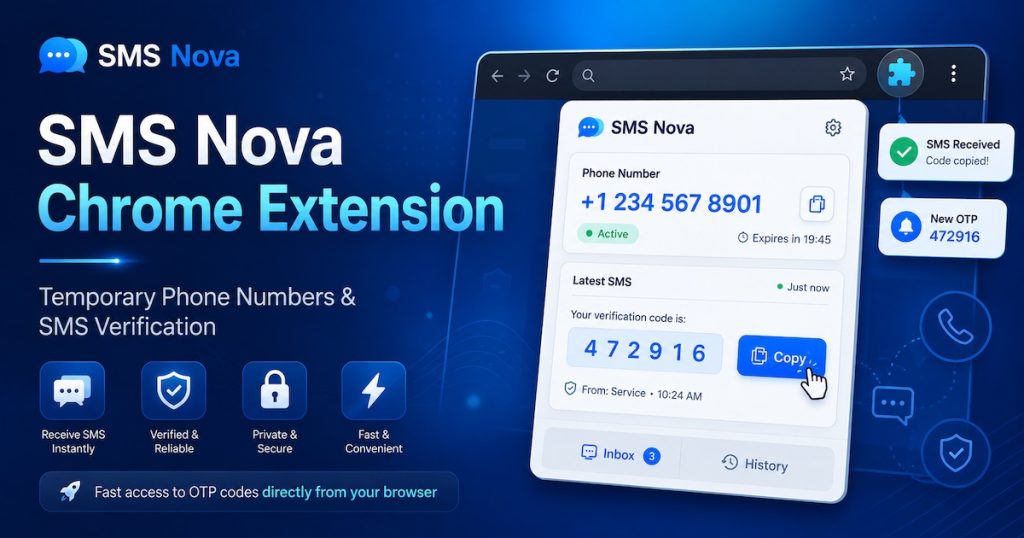
The SMS Nova Chrome Extension makes it easier to manage temporary phone numbers and receive SMS verification codes directly from your browser.
Instead of repeatedly switching between the website and the page where you need a verification code, SMS Nova gives you quick access to your virtual numbers, active orders, incoming SMS messages, OTP codes, and account information from the Chrome toolbar.
The extension is designed as a companion for SMS Nova users who want a faster and more convenient way to manage SMS verification while browsing.
1. What Is the SMS Nova Chrome Extension?
SMS Nova is a Chrome browser extension connected to your SMS Nova account.
Once installed, you can access important SMS Nova functions from a small popup inside Chrome without leaving the website you are currently using.
The extension can help you:
- View active virtual-number orders.
- Receive incoming SMS and OTP codes.
- Copy phone numbers with one click.
- Copy verification codes with one click.
- Receive desktop notifications when a new SMS arrives.
- Rent a new virtual phone number directly from the extension.
- Choose a service and country when ordering a number.
- Check your SMS Nova wallet balance.
- Browse previous orders.
- Use dark mode.
- Open SMS Nova quickly with a keyboard shortcut.
The Chrome Web Store currently lists the keyboard shortcut as Ctrl + Shift + S on Windows and Cmd + Shift + S on macOS.
2. Receive SMS Verification Codes Without Leaving Your Current Tab
One of the main advantages of the SMS Nova Chrome Extension is convenience.
When a website asks you to verify a phone number, you can open the SMS Nova extension directly from the Chrome toolbar.
You can then choose a virtual number, copy it, enter it on the website, and monitor the incoming SMS from the extension.
When the verification message arrives, the OTP can be viewed and copied directly from the extension popup.
This reduces the need to constantly switch tabs between SMS Nova and the website where the phone number is being used.
3. Desktop Notifications for New SMS Codes
The SMS Nova Chrome Extension can also notify you when a new SMS or verification code arrives.
This is useful when a verification message takes a little longer than expected.
Instead of repeatedly refreshing a page, you can continue browsing and wait for the extension notification.
When the SMS arrives, open the extension, copy the verification code, and continue with the verification process.
4. Rent Virtual Numbers Directly From Chrome
Users do not have to return to the SMS Nova website every time they want another number.
The extension allows you to start a new virtual-number order from the popup.
Select the service and country you need, obtain the number, and manage the order from the same browser interface.
5. Check Your SMS Nova Balance
Your current wallet balance is also available from the extension.
This makes it easier to see whether you have enough balance before renting another temporary number.
You can also access your order history to review numbers and previous SMS verification orders.
6. Simple Account Login
SMS Nova is designed so that you do not need to type your SMS Nova password directly into the browser extension.
If you already have an active session on the SMS Nova website, the extension can detect that session.
Alternatively, SMS Nova provides a one-time login-code method through the account settings.
An SMS Nova account is required to use the extension.
7. Install SMS Nova From the Chrome Web Store
The official extension is available on the Chrome Web Store as:
SMS Nova – Temporary Phone Number
Open SMS Nova on the Chrome Web Store
Below are localized Chrome Web Store URLs for users browsing the store in different languages and regions.
Note: These links use Chrome Web Store locale parameters. The Chrome Web Store currently identifies English as the extension’s listed language, so a localized Store URL does not necessarily mean that every part of the extension interface or description has been manually translated into that language.
8. SMS Nova Chrome Extension – 54 Localized Chrome Web Store URLs
1. Arabic
SMS Nova Chrome Extension – Arabic
2. Amharic
SMS Nova Chrome Extension – Amharic
3. Bulgarian
SMS Nova Chrome Extension – Bulgarian
4. Bengali
SMS Nova Chrome Extension – Bengali
5. Catalan
SMS Nova Chrome Extension – Catalan
6. Czech
SMS Nova Chrome Extension – Czech
7. Danish
SMS Nova Chrome Extension – Danish
8. German
SMS Nova Chrome Extension – German
9. Greek
SMS Nova Chrome Extension – Greek
10. English – Australia
SMS Nova Chrome Extension – English Australia
11. English – United Kingdom
SMS Nova Chrome Extension – English UK
12. English – United States
SMS Nova Chrome Extension – English US
13. Spanish
SMS Nova Chrome Extension – Spanish
14. Spanish – Latin America & Caribbean
SMS Nova Chrome Extension – Spanish Latin America
15. Estonian
SMS Nova Chrome Extension – Estonian
16. Persian
SMS Nova Chrome Extension – Persian
17. Finnish
SMS Nova Chrome Extension – Finnish
18. Filipino
SMS Nova Chrome Extension – Filipino
19. French
SMS Nova Chrome Extension – French
20. Gujarati
SMS Nova Chrome Extension – Gujarati
21. Hebrew
SMS Nova Chrome Extension – Hebrew
22. Hindi
SMS Nova Chrome Extension – Hindi
23. Croatian
SMS Nova Chrome Extension – Croatian
24. Hungarian
SMS Nova Chrome Extension – Hungarian
25. Indonesian
SMS Nova Chrome Extension – Indonesian
26. Italian
SMS Nova Chrome Extension – Italian
27. Japanese
SMS Nova Chrome Extension – Japanese
28. Kannada
SMS Nova Chrome Extension – Kannada
29. Korean
SMS Nova Chrome Extension – Korean
30. Lithuanian
SMS Nova Chrome Extension – Lithuanian
31. Latvian
SMS Nova Chrome Extension – Latvian
32. Malayalam
SMS Nova Chrome Extension – Malayalam
33. Marathi
SMS Nova Chrome Extension – Marathi
34. Malay
SMS Nova Chrome Extension – Malay
35. Dutch
SMS Nova Chrome Extension – Dutch
36. Norwegian
SMS Nova Chrome Extension – Norwegian
37. Polish
SMS Nova Chrome Extension – Polish
38. Portuguese – Brazil
SMS Nova Chrome Extension – Portuguese Brazil
39. Portuguese – Portugal
SMS Nova Chrome Extension – Portuguese Portugal
40. Romanian
SMS Nova Chrome Extension – Romanian
41. Russian
SMS Nova Chrome Extension – Russian
42. Slovak
SMS Nova Chrome Extension – Slovak
43. Slovenian
SMS Nova Chrome Extension – Slovenian
44. Serbian
SMS Nova Chrome Extension – Serbian
45. Swedish
SMS Nova Chrome Extension – Swedish
46. Swahili
SMS Nova Chrome Extension – Swahili
47. Tamil
SMS Nova Chrome Extension – Tamil
48. Telugu
SMS Nova Chrome Extension – Telugu
49. Thai
SMS Nova Chrome Extension – Thai
50. Turkish
SMS Nova Chrome Extension – Turkish
51. Ukrainian
SMS Nova Chrome Extension – Ukrainian
52. Vietnamese
SMS Nova Chrome Extension – Vietnamese
53. Chinese – Simplified
SMS Nova Chrome Extension – Simplified Chinese
54. Chinese – Traditional
SMS Nova Chrome Extension – Traditional Chinese
55. English Global
SMS Nova Chrome Extension – English
9. Why Use the SMS Nova Chrome Extension?
The SMS Nova extension is useful for users who regularly work with temporary phone numbers and SMS verification.
Instead of keeping another browser tab open, the extension puts the most frequently used SMS Nova functions directly into the Chrome toolbar.
You can manage numbers, monitor SMS messages, copy OTP codes, check your balance, and start new orders from one convenient interface.
10. Get Started
Install SMS Nova – Temporary Phone Number from the Chrome Web Store, sign in to your SMS Nova account, and access your virtual numbers directly from Chrome.
Install SMS Nova Chrome Extension
Microsoft EGDE browser users can use the official SMS Nova EDGE Extension, while Mozilla Firefox users can install the official SMS Nova Firefox Add-on.
 Apple
Apple  Telegram