Need a Virtual Number Right Now?
Skip the wait — rent an instant virtual number and start receiving SMS codes in seconds.
SMS-Based 2FA vs. Authenticator Apps: Which Is Safer? · 2:06
Transcript
When logging in to an online account, you may be asked to enter an OTP code sent via SMS or use an application such as Google Authenticator or Microsoft Authenticator. Both provide an additional layer of protection beyond a password, but is their level of security the same? In recent years, attacks such as SIM Swapping, Smishing, and credential theft have made choosing a two-factor authentication method more important. So, in the comparison of SMS 2FA vs. Authenticator App, which method is more secure? Authenticator apps that generate TOTP codes are generally more secure than SMS 2FA, because the codes are generated on the device instead of being transmitted over telecommunications networks. However, both methods can still be targeted by phishing attacks. This article will analyze how they work, compare their advantages and disadvantages, examine security risks, and guide you in choosing a suitable authentication method. What Is Two-Factor Authentication (2FA)? Two-Factor Authentication (2FA) is an authentication method that uses two factors from different categories to verify the identity of the person logging in. Normally, logging in only requires an account name and password. If the password is exposed, someone else may be able to access the account. 2FA adds another factor to reduce this risk. The three common categories of authentication factors include: Something You Know: Information you know, such as a password. Something You Have: Something you own or control, such as a phone or security key. Something You Are: Biometric characteristics such as fingerprints. For example, after entering a password, the system requires an additional OTP sent to your phone. How Are 2FA and MFA Different? 2FA uses two authentication factors, while Multi-Factor Authentication (MFA) is a broader term that uses two or more factors. However, receiving an SMS code to verify a phone number when registering an account is not necessarily considered 2FA.
When logging in to an online account, you may be asked to enter an OTP code sent via SMS or use an application such as Google Authenticator or Microsoft Authenticator. Both provide an additional layer of protection beyond a password, but is their level of security the same?
In recent years, attacks such as SIM Swapping, Smishing, and credential theft have made choosing a two-factor authentication method more important. So, in the comparison of SMS 2FA vs. Authenticator App, which method is more secure?
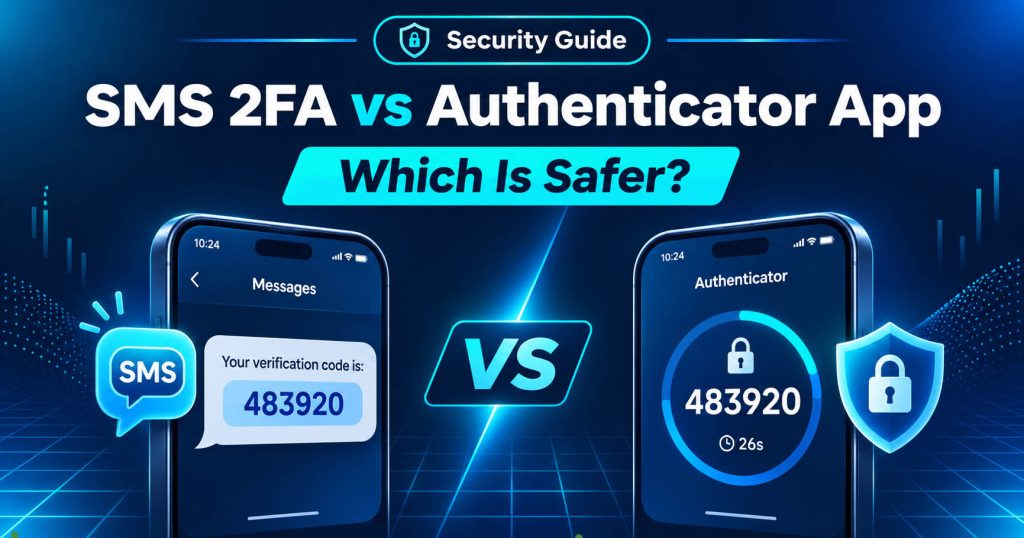
Authenticator apps that generate TOTP codes are generally more secure than SMS 2FA, because the codes are generated on the device instead of being transmitted over telecommunications networks. However, both methods can still be targeted by phishing attacks.
This article will analyze how they work, compare their advantages and disadvantages, examine security risks, and guide you in choosing a suitable authentication method.
What Is Two-Factor Authentication (2FA)?
Two-Factor Authentication (2FA) is an authentication method that uses two factors from different categories to verify the identity of the person logging in.
Normally, logging in only requires an account name and password. If the password is exposed, someone else may be able to access the account. 2FA adds another factor to reduce this risk.
The three common categories of authentication factors include:
- Something You Know: Information you know, such as a password.
- Something You Have: Something you own or control, such as a phone or security key.
- Something You Are: Biometric characteristics such as fingerprints.
For example, after entering a password, the system requires an additional OTP sent to your phone.
How Are 2FA and MFA Different?
2FA uses two authentication factors, while Multi-Factor Authentication (MFA) is a broader term that uses two or more factors. However, receiving an SMS code to verify a phone number when registering an account is not necessarily considered 2FA. It may simply be a step to prove access to the phone number.
What Is SMS 2FA and How Does It Work?
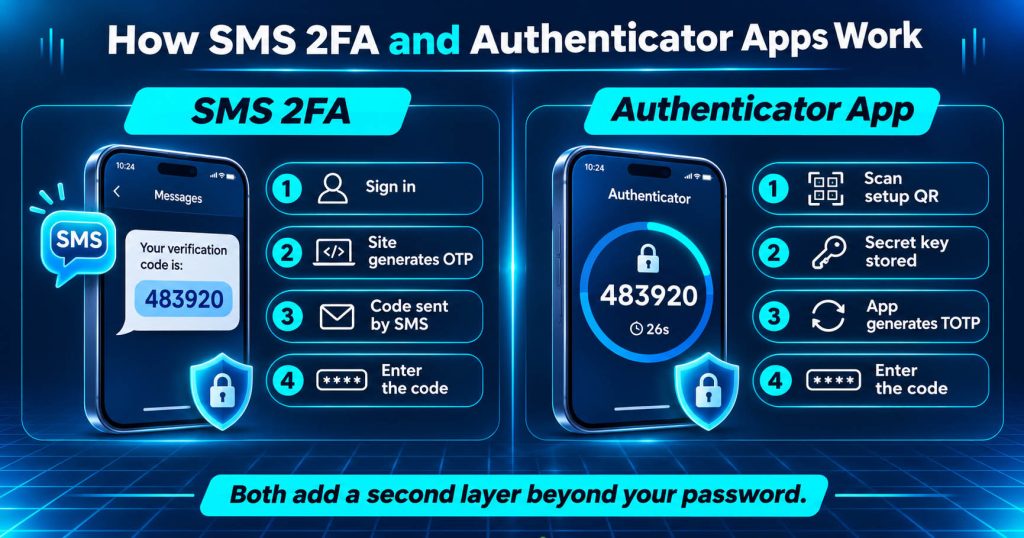
SMS-Based Two-Factor Authentication is a method of sending a one-time verification code to a registered phone number to add an additional verification step during login.
The process usually takes place as follows:
- The user enters their username and password.
- The website generates an OTP code.
- The system sends the code through an SMS Gateway and telecommunications network.
- The phone receives a text message containing the OTP.
- The user enters the code to complete the login process.
Advantages of SMS 2FA
SMS 2FA has the advantages of being widely available and easy to use. Users do not need to install a separate authentication application. They only need a supported phone number and the ability to receive SMS.
This method is also suitable for services that do not yet support modern authentication methods. More importantly, SMS 2FA still provides an additional layer of protection compared with using only a password.
Limitations of SMS 2FA
Although convenient, this method depends on the phone number and telecommunications infrastructure.
Some risks include:
- SIM Swapping, which allows a phone number to be taken over.
- OTP messages being delayed or not delivered.
- Users being tricked into providing codes through phishing.
- Phone numbers being reassigned or access to them being lost.
NIST SP 800-63B classifies the use of the public telephone network for out-of-band authentication as a method with security limitations.
What Is an Authenticator App and How Does It Work?
An Authenticator App is an authentication application that generates OTP codes on a device based on a secret key previously established with an online platform.
Popular applications include Google Authenticator, Microsoft Authenticator, 2FAS, and Ente Auth. Many applications use the Time-Based One-Time Password (TOTP) algorithm, which is described in the RFC 6238 standard.
How Does a TOTP Application Generate Verification Codes?
When activating an authentication application, the website usually provides a QR code containing setup data or a secret key. The application stores the corresponding key and uses it together with the time to generate verification codes. TOTP codes usually change after approximately 30 seconds, depending on the service configuration. When logging in, users open the application, retrieve the current code, and enter it on the website.
Does an Authenticator App Need Internet Access?
Standard TOTP applications can generate codes without an Internet connection after setup is complete. They do not need to wait for messages sent over mobile networks. However, features such as data synchronization, backups, or login approval through push notifications may require Internet access. This also means that SIM Swapping alone does not allow attackers to receive TOTP codes from your application.
SMS 2FA vs. Authenticator App: 10 Key Differences
To make a suitable choice, compare the two methods based on the most important factors.
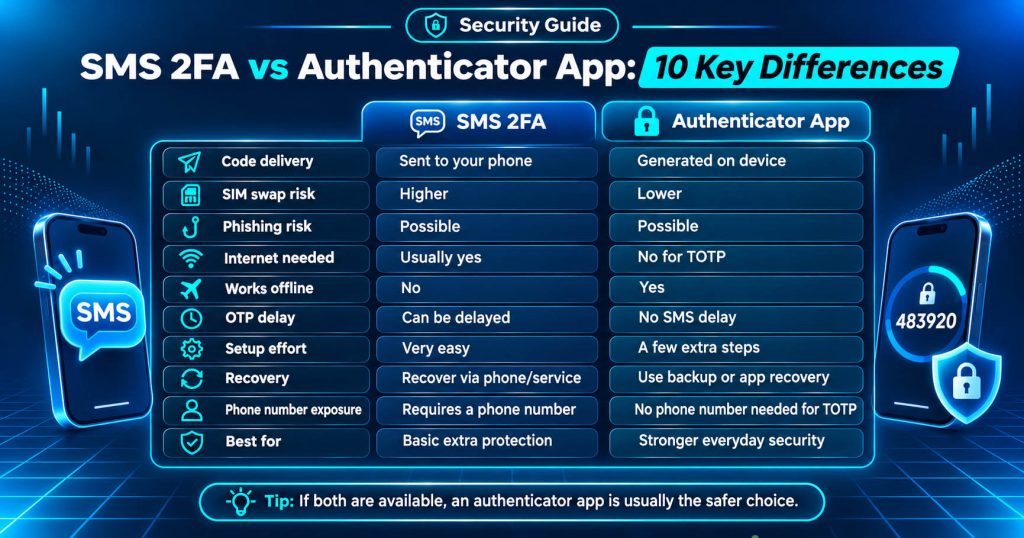
1. How Verification Codes Are Generated
SMS 2FA uses codes generated by the system and sent to a phone number. An Authenticator App using TOTP generates codes on the device from a previously established secret key.
2. Protection Against SIM Swapping
SMS 2FA is at risk when a phone number is transferred to a SIM or eSIM controlled by an attacker. TOTP applications do not depend on a phone number to generate codes, so they avoid the risk of codes being redirected through SIM Swapping alone.
3. Protection Against Phishing
Both methods can be targeted by phishing if users enter OTPs on fake websites. An Authenticator App does not automatically recognize whether the website requesting the code is legitimate.
4. Network Connection Requirements
SMS requires the message-sending and receiving infrastructure to be operational. TOTP can generate codes offline after setup.
5. Reliability of Code Delivery
SMS may be delayed due to carrier issues or routing errors. TOTP does not require waiting for messages, but the device’s time must be accurate for the code to be verified.
6. Recovery Capabilities
SMS depends on control of the phone number. An Authenticator App depends on the device, secret key, backup method, and recovery codes.
7. Ease of Use
SMS is generally more accessible for beginners. An Authenticator App requires additional setup steps, QR code scanning, and management of authentication data.
8. Cost
SMS may incur message-sending costs for the service provider. Standard TOTP applications generally do not need to send an SMS for each login.
9. Privacy
SMS 2FA requires a registered phone number. TOTP does not necessarily require a phone number to generate codes, although the platform may still collect a phone number for other reasons.
10. Long-Term Security
An Authenticator App helps reduce dependence on mobile carriers and control of phone numbers. However, the level of security still depends on protecting the device, backup account, and recovery methods.
Comparison Table: SMS 2FA vs. Authenticator App
| Criteria | SMS 2FA | Authenticator App (TOTP) |
|---|---|---|
| How codes are received | Via SMS | Generated on the device |
| Requires a mobile network | Usually required to receive codes | No |
| Offline operation | Cannot generate codes offline | Yes |
| SIM Swapping risk | Yes | Not directly |
| Phishing risk | Yes | Yes |
| OTP delays | May occur | Does not depend on SMS |
| Requires installing an additional app | No | Usually yes |
| SMS sending costs | May incur costs | No |
| Recovery | Through the phone number and backup methods | Through backups, devices, or recovery codes |
| Relative security level | Lower | Higher |
Conclusion: An Authenticator App using TOTP is generally a better choice than SMS 2FA when both methods are supported.
Why Does SMS 2FA Have More Security Risks?
The biggest weakness of SMS 2FA is that verification codes must be transmitted to a phone number through telecommunications networks.
SIM Swapping Attack
SIM Swapping is a form of taking control of a phone number by transferring it to another SIM or eSIM without authorization. If an attacker already knows the password and takes control of the phone number, they can receive new OTPs sent to that number. This is an important reason why SMS 2FA is less secure than TOTP.
Read more: What Is SIM Swapping?.
SMS Interception
Under certain attack conditions, messages may be accessed or redirected without authorization through weaknesses in telecommunications systems or devices. However, this does not mean that all SMS messages can be easily intercepted.
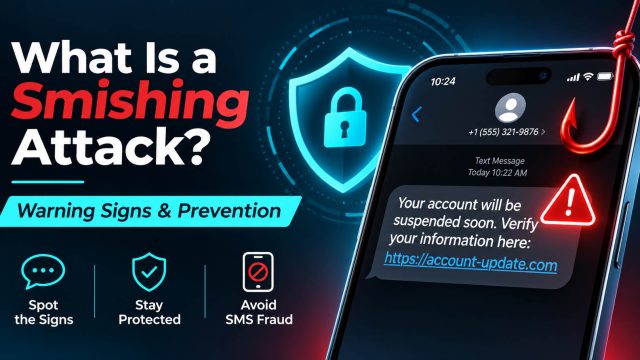
Smishing and OTP Theft
Attackers may impersonate banks or support departments to ask users to provide OTP codes. If victims comply, the codes may be used to log in or perform unauthorized actions.
You can learn more in the article What Is Smishing Attack?.
Phone Number Reassignment
If users stop maintaining a number but do not remove it from their accounts, reassignment may create risks related to account verification and recovery. This is why security information needs to be updated regularly.
Can an Authenticator App Be Hacked or Bypassed?
Yes. Although more secure than SMS against certain types of attacks, authentication applications are not completely immune to risks.
Real-Time Phishing
Attackers can create fake websites and ask users to enter both their passwords and TOTP codes. If the codes are still valid, attackers may use them during unauthorized login attempts. According to NIST, OTP methods that require manually entering codes are not considered phishing-resistant.
Malware
If a device is compromised or the TOTP secret key is stolen, its protection may be affected.
Push Notification Fatigue
Some applications support login approval through push notifications. Attackers may repeatedly send login requests in an attempt to make users accidentally approve them. This is a risk associated with certain push notification authentication processes, not the standard TOTP code-generation mechanism.
Device or Backup Data Loss
If users lose their phones and do not have recovery codes, they may encounter difficulties accessing their accounts. Therefore, properly protecting and backing up authentication data is very important.
SMS 2FA or Authenticator App: Which Method Should You Choose?
The suitable choice depends on the importance of the account and the authentication methods supported by the platform.
For Social Media Accounts
You should prioritize Authenticator Apps or passkeys when available. This helps reduce dependence on SMS and limit risks resulting from losing control of a phone number.
For Bank Accounts
Use the strongest security method provided by the bank. This may include in-app transaction authentication, security keys, or a dedicated authentication mechanism.
For Email and Password Manager Accounts
You should prioritize passkeys or security keys that support phishing-resistant authentication. These accounts can affect many other services if they are compromised.
Need a Virtual Number Right Now?
Skip the wait — rent an instant virtual number and start receiving SMS codes in seconds.
For Business Accounts
Businesses should prioritize FIDO2/WebAuthn, especially for administrator accounts and systems that store sensitive data.
When a Website Only Supports SMS 2FA
SMS 2FA is still better than having no two-factor authentication.
If there is no other option, enable SMS 2FA, use a strong password, protect your mobile carrier account, and never share OTP codes.
Are Passkeys and Security Keys More Secure?
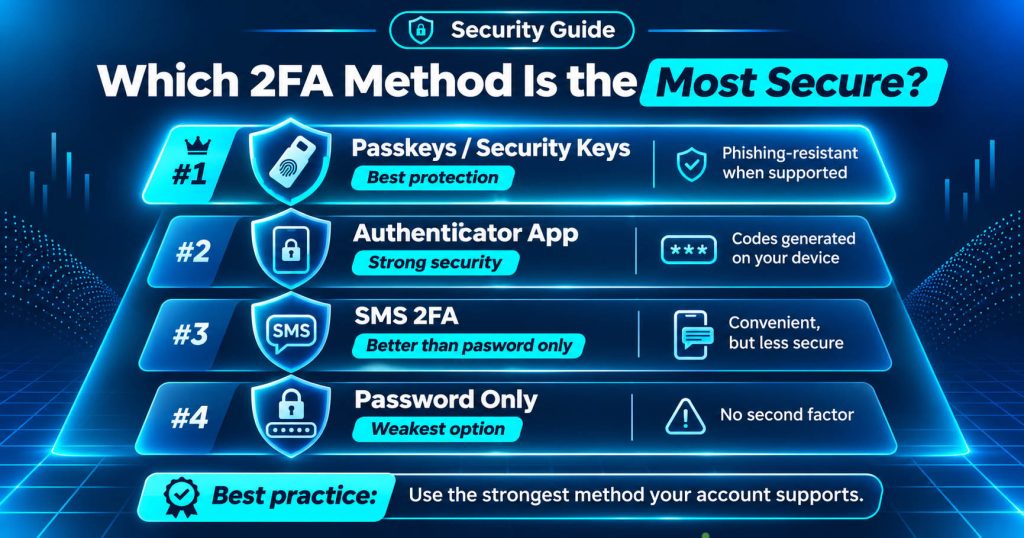
Yes. When implemented correctly, passkeys and security keys based on FIDO2/WebAuthn provide stronger phishing resistance than manually entered OTPs.
Instead of requiring users to copy a verification code, these systems use public-key cryptography and bind authentication to a legitimate website. This helps reduce the risk of credentials being used on fake websites.
Security Priority Ranking
| Method | Characteristics |
|---|---|
| Passkeys / FIDO2 Security Keys | Strong phishing resistance when properly implemented |
| Authenticator App (TOTP) | Does not depend on SMS, but can still be targeted by phishing |
| SMS 2FA | Easy to use but carries risks involving phone numbers |
| Password Only | No additional authentication factor |
This is a general recommended order. Actual effectiveness still depends on the configuration, device, and recovery methods.
Guide to Switching from SMS 2FA to an Authenticator App
If your account supports an authentication app, you can switch by following these steps.
Step 1: Choose a Trusted App
Install Google Authenticator, Microsoft Authenticator, or a suitable TOTP app from an official source.
Step 2: Open Your Account’s Security Settings
Go to the Security, Two-Factor Authentication, or Two-Step Verification section.
Step 3: Select Authenticator App
The website will usually display a QR code or setup key. Open the authentication app and scan the QR code as instructed. Do not share this QR code or secret key.
Step 4: Verify the TOTP Code
The app will generate an OTP code. Enter the code on the website to complete the linking process.
Step 5: Save Recovery Codes
If the platform provides recovery codes, save them in a secure location, such as a trusted password manager or a protected offline backup.
Step 6: Test the Login Process
Try logging in using the new method while you still have access to your account.
Step 7: Check SMS Fallback
After confirming that the Authenticator App and recovery methods are working, consider disabling SMS fallback if the platform allows it.
Do not disable the old method before confirming that the new method has been set up successfully.
What Happens If You Lose the Phone Containing Your Authenticator App?
Losing your phone does not necessarily mean losing access to your account if you have prepared recovery methods.
You can use:
- Recovery codes provided when setting up 2FA.
- The app’s synced or backed-up data.
- A backup authentication device.
- The platform’s official recovery process.
Google Authenticator has synchronization or code-transfer mechanisms between devices, depending on how the account is configured and used. However, you should not assume that every app automatically restores all authentication codes. For important accounts, check your backup methods before replacing your phone or deleting the app.
Advice from SMS Nova: Should You Use SMS 2FA or an Authenticator App?
According to SMS Nova security guidance for users, SMS OTP remains a useful method for phone number verification and certain login processes.
However, it is important to distinguish between two purposes:
SMS Verification: Verifying access to a phone number at the time of registration or when carrying out a transaction.
SMS-Based 2FA: Using a phone number as an authentication factor for subsequent logins.
These two needs have different security requirements and different periods of number control.
SMS Nova Security Recommendations
For important accounts such as your primary email, financial accounts, or administrative systems, you should prioritize a suitable Authenticator App, passkeys, or security keys.
If only SMS 2FA is available, you should still enable it and protect the linked phone number. Do not share OTP codes, do not enter codes on suspicious websites, and regularly check your recovery information.
Are Temporary Phone Numbers Suitable for 2FA?
Temporary phone numbers can be used to receive SMS during short-term verification sessions permitted by the platform.
However, SMS Nova does not recommend using short-term rented numbers as the sole 2FA or account recovery method for important accounts.
After the rental session ends, you may no longer have access to receive SMS at that number.
When Should You Use SMS Nova?
If you need to receive SMS online for legitimate short-term verification activities, SMS Nova provides temporary phone number and virtual phone number services.
Users can:
- Select a supported country and platform.
- Check prices and number availability.
- Rent a number for short-term verification needs.
- Receive SMS through the dashboard.
- Avoid purchasing an additional physical SIM card for a single code-receiving session.
SMS Nova uses a per-number payment model, with rental prices varying by country and service.
You can check SMS Nova Pricing.
Explore SMS Nova temporary phone number service to receive SMS online in cases supported by the platform.
Frequently Asked Questions About SMS 2FA vs. Authenticator App
1. Is an Authenticator App More Secure Than SMS 2FA?
Generally, yes. TOTP apps do not depend on receiving codes through the SMS network, so they avoid the risk of code theft through SIM Swapping alone. However, TOTP codes can still be phished.
2. Is SMS 2FA Still Secure?
SMS 2FA still adds a layer of protection compared to using only a password. However, if an Authenticator App or passkeys are available, you should consider a stronger method.
3. Does an Authenticator App Work Without Internet?
Yes. Standard TOTP apps can generate codes offline after being set up. Features such as backups and push notification login approvals may require an Internet connection.
4. Can Google Authenticator Be Hacked?
This is possible if the device, secret key, or backup data is compromised. In addition, users are still at risk of disclosing their codes on phishing websites.
5. Does SMS 2FA Prevent SIM Swapping?
No. If an attacker takes control of your phone number, they may receive new OTP codes sent to that number.
6. Should You Disable SMS After Enabling an Authenticator App?
You can consider doing so if the platform allows it, but first you need to check that the app is working correctly and that you have prepared recovery methods.
7. Are Passkeys More Secure Than an Authenticator App?
Passkeys based on properly implemented FIDO2/WebAuthn offer better phishing resistance than manually entered TOTP codes.
8. Can You Use a Temporary Phone Number for 2FA?
Some platforms may accept temporary numbers, but you should not use short-term rented numbers as the sole protection or recovery method for accounts that need to be maintained long-term.
Conclusion: Is SMS 2FA or an Authenticator App More Secure?
In the comparison of SMS 2FA vs. Authenticator App, TOTP authentication apps are generally more secure because they do not depend on sending codes through telecommunications networks.
However, both methods still carry phishing risks. For important accounts, passkeys or FIDO2 security keys are options worth prioritizing when supported. If a website only offers SMS 2FA, you should still enable this feature rather than relying on a password alone.
The important thing is to choose a suitable method, protect your devices, and prepare secure recovery mechanisms. To learn more about SMS Verification and risks related to phone numbers, explore the security guides on SMS Nova.
Reference sources:
https://pages.nist.gov/800-63-4/sp800-63b.html
https://consumer.ftc.gov/articles/use-two-factor-authentication-protect-your-accounts
https://datatracker.ietf.org/doc/html/rfc6238
https://support.google.com/accounts/answer/1066447
https://support.google.com/accounts/answer/1187538
Need a Virtual Number Right Now?
Skip the wait — rent an instant virtual number and start receiving SMS codes in seconds.

 Apple
 Telegram