Need a Virtual Number Right Now?
Skip the wait — rent an instant virtual number and start receiving SMS codes in seconds.
What Is SIM Swapping and How Can You Prevent It? · 2:01
Transcript
SIM Swapping is a method of taking control of another person's phone number by transferring that number to a SIM card or eSIM controlled by the attacker. When this process is successful, the victim may lose mobile signal and be unable to receive calls or SMS messages, while the attacker begins receiving all OTP codes, verification calls, or security notifications sent to that phone number. In essence, changing a SIM card or transferring a phone number is not always fraudulent. In many legitimate cases, users may request a replacement SIM card from their carrier because their SIM card is lost or damaged, they change phones, or they switch from a physical SIM card to an eSIM. However, SIM Swapping becomes a security attack when criminals impersonate the subscriber to transfer the number without the actual owner's permission. Today, phone numbers are often linked to many important services, such as email accounts, banks, e-wallets, social media, and two-factor authentication via SMS. Therefore, if an attacker takes control of a phone number, the consequences go beyond losing communication access and may also lead to the loss of access to multiple online accounts. How Does SIM Swapping Work? To carry out SIM swap fraud, attackers usually do not need to have the victim's phone in their possession. Instead, they target the carrier's subscriber management process and exploit weaknesses in identity verification procedures. 1. Collecting Personal Information The first step is usually to collect information about the victim. Data such as their full name, phone number, email address, date of birth, or answers to security questions may be exposed through: Social media Data breaches Phishing emails Spoofed customer support calls Public records or illegally traded data The more information criminals obtain, the greater their chances of impersonating the subscriber to the carrier. 2.
SIM Swapping is a method of taking control of another person’s phone number by transferring that number to a SIM card or eSIM controlled by the attacker. When this process is successful, the victim may lose mobile signal and be unable to receive calls or SMS messages, while the attacker begins receiving all OTP codes, verification calls, or security notifications sent to that phone number.
In essence, changing a SIM card or transferring a phone number is not always fraudulent. In many legitimate cases, users may request a replacement SIM card from their carrier because their SIM card is lost or damaged, they change phones, or they switch from a physical SIM card to an eSIM. However, SIM Swapping becomes a security attack when criminals impersonate the subscriber to transfer the number without the actual owner’s permission.
Today, phone numbers are often linked to many important services, such as email accounts, banks, e-wallets, social media, and two-factor authentication via SMS. Therefore, if an attacker takes control of a phone number, the consequences go beyond losing communication access and may also lead to the loss of access to multiple online accounts.
How Does SIM Swapping Work?
To carry out SIM swap fraud, attackers usually do not need to have the victim’s phone in their possession. Instead, they target the carrier’s subscriber management process and exploit weaknesses in identity verification procedures.
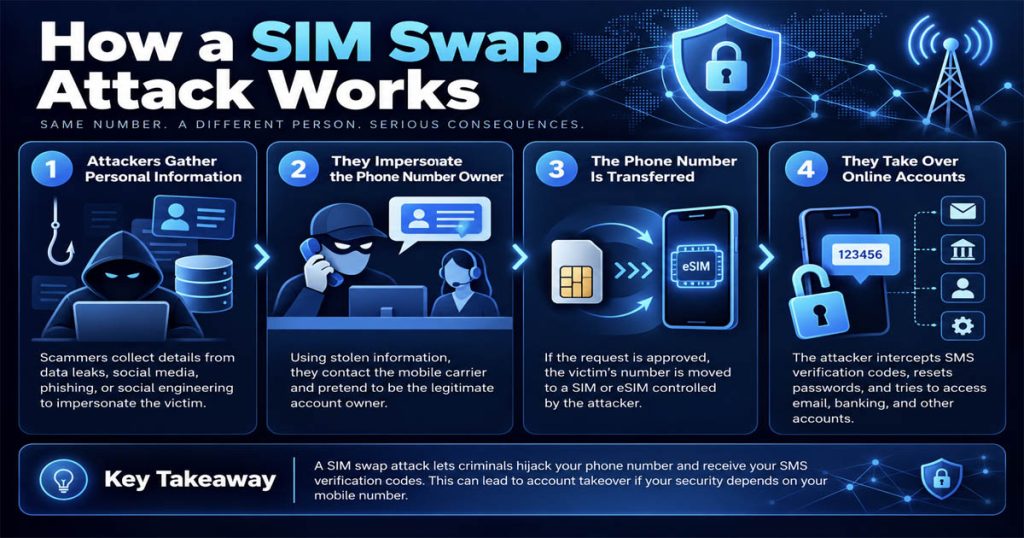
1. Collecting Personal Information
The first step is usually to collect information about the victim. Data such as their full name, phone number, email address, date of birth, or answers to security questions may be exposed through:
- Social media
- Data breaches
- Phishing emails
- Spoofed customer support calls
- Public records or illegally traded data
The more information criminals obtain, the greater their chances of impersonating the subscriber to the carrier.
2. Impersonating the Phone Number’s Owner
After obtaining enough information, the attacker contacts the carrier and pretends to be the owner of the phone number. They may provide excuses such as:
- Having lost the SIM card
- Having a damaged phone
- Wanting to switch to an eSIM
- Needing an urgent SIM card replacement
If the carrier’s verification process is not sufficiently strict, the request may be approved.
3. Transferring the Phone Number to a New SIM/eSIM
Once the carrier approves the request, the phone number is transferred from the victim’s current SIM card to a SIM card or eSIM controlled by the attacker. From that point onward:
- The victim’s phone may display “No Service” or “SOS Only”
- The victim can no longer receive new SMS messages or calls
- The attacker begins receiving messages and calls sent to that phone number
4. Taking Over Online Accounts
After gaining control of the phone number, the attacker may begin resetting passwords for various services linked to that number. If a system sends an OTP code via SMS for verification, the code will fall into the attacker’s hands. From there, they may be able to:
- Log in to email accounts
- Reset bank account or e-wallet passwords
- Access social media accounts
- Bypass SMS-based two-factor authentication
- Continue taking over additional accounts
This is why SIM Swapping is particularly dangerous for users who rely too heavily on SMS OTP as their only layer of protection.
Distinguishing SIM Swapping, SIM Cloning, and Port-Out Fraud
Many people often confuse these three concepts as being the same, but in reality, they are different.
SIM Swapping
This is the act of transferring a phone number to another SIM card or eSIM through the process of issuing a replacement or changing subscriber information. If the transfer is requested by the phone number’s owner, it is legal; if it is carried out without authorization by criminals, it is SIM swap fraud.
SIM Cloning
SIM cloning involves copying SIM identification data to create a duplicate. This is a technical concept that differs from SIM swapping. In modern practice, SIM cloning is not always easy to perform with newer types of SIM cards, and it should not be considered the most common method criminals use to take over phone numbers.
Port-Out Fraud
Port-out fraud occurs when criminals transfer a victim’s phone number to another mobile carrier without authorization. Meanwhile, SIM swapping can often take place within the same carrier when a SIM card is replaced or a number is reissued. Both can result in the loss of control over a phone number.
Why Is SIM Swapping Dangerous?
SIM Swapping is dangerous because phone numbers today are not used only for communication. They are also keys to verifying identities across many online services.
1. Stealing OTP Codes and SMS Verification Messages
Many websites and applications still use SMS OTP as part of the login or account recovery process. When a phone number is taken over, all verification codes may go directly to the attacker’s device.
2. Taking Over Email Accounts
Email is often the center of an entire digital account ecosystem. If an email account is taken over, hackers may continue resetting passwords for other services, such as banks, social media, cryptocurrency exchanges, or work accounts.
3. Financial Risks
Bank accounts, e-wallets, and investment services may be compromised if their verification processes depend on a phone number. For victims involved in crypto or digital finance, the losses can be particularly severe.
4. Losing Access to Multiple Accounts at the Same Time
A SIM swap attack does not affect just one service. If the same phone number is used across multiple platforms, victims may lose control of numerous accounts almost simultaneously.
See more: What Is SMS Verification and How Does It Work?
Signs That You May Be Experiencing SIM Swapping
Losing signal does not necessarily mean that you have been targeted by a SIM swap, but there are several signs worth paying close attention to.
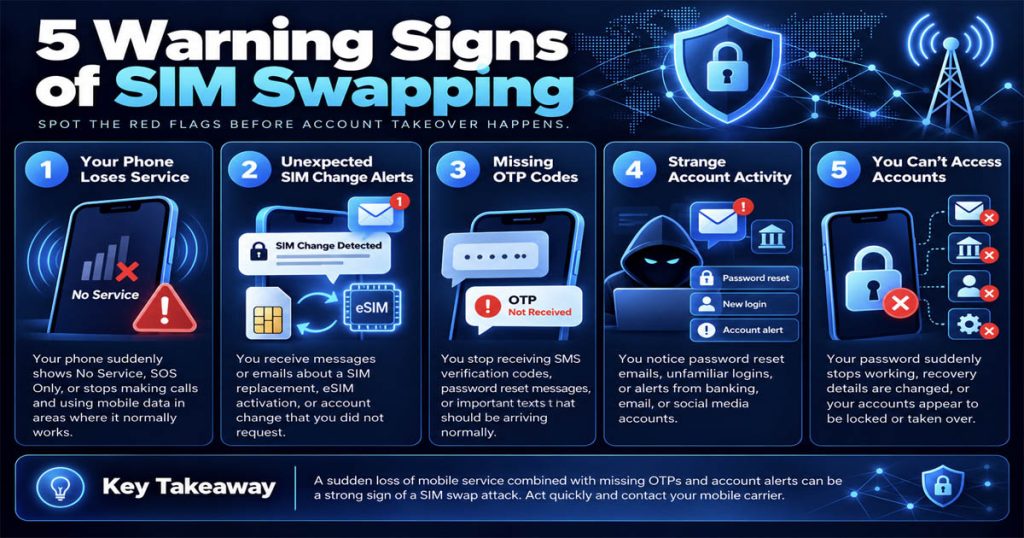
Sudden Loss of Mobile Signal
If your phone displays “No Service” or “Emergency Calls Only,” or you cannot make calls, receive calls, or receive SMS messages even though everything was working normally before, you should be cautious.
Not Receiving OTP Codes or Verification Messages
If you are waiting for a login code or verification code but do not receive it, especially when this happens at the same time as a loss of signal, it may be an unusual warning sign.
Receiving Notifications About SIM Changes or Mobile Carrier Account Changes
Emails or messages about activating a new SIM, transferring to an eSIM, changing subscriber account details, or requesting a SIM replacement that you did not initiate should be treated as serious warnings.
Detecting Suspicious Account Activity
If you notice password reset emails, unfamiliar login notifications, unknown financial transactions, or an inability to access accounts you regularly use, you need to take action immediately.
How to Effectively Prevent SIM Swapping
This is the most important section for both ordinary users and people who work with high-value accounts.
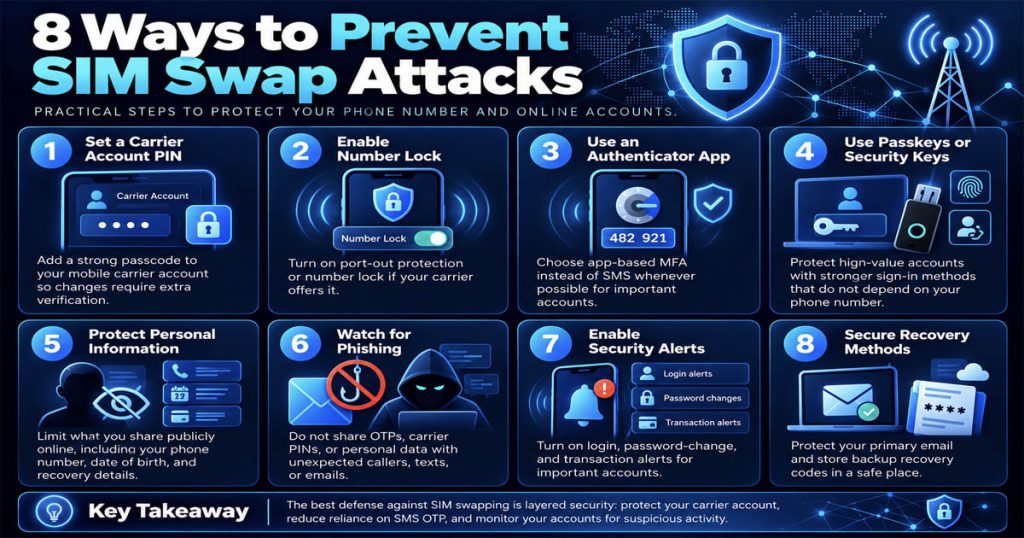
1. Set Up a PIN or Passcode for Your Mobile Carrier Account
Many people confuse SIM PIN with Carrier Account PIN. These are two different mechanisms.
– SIM PIN: Protects the SIM card on a device when it starts up or when the SIM is inserted into another device.
– Carrier Account PIN: Used for verification when there is a request to change subscriber account details, replace a SIM card, or transfer a phone number.
To reduce the risk of impersonation, you should contact your mobile carrier and request a separate PIN or passcode for your subscriber account. Do not use your date of birth or easily guessable number sequences.
Need a Virtual Number Right Now?
Skip the wait — rent an instant virtual number and start receiving SMS codes in seconds.
2. Enable Number Lock or Port-Out Protection if Your Carrier Supports It
Some mobile carriers support number transfer locks, account change locks, or port-out protection. These provide an additional layer of security to help prevent unauthorized number transfers. If this feature is available, enable it as soon as possible.
3. Prioritize Authenticator Apps Over SMS OTP
If a service allows you to use an authenticator app, such as:
- Google Authenticator
- Microsoft Authenticator
- Authy
- Other reputable TOTP apps
you should prioritize these over SMS OTP. TOTP codes are generated within an app rather than sent through a phone number, so they will not be redirected simply because of a SIM swap.
However, it is also important to understand that TOTP is not invulnerable; it can still be stolen if users fall victim to phishing or their devices are compromised. Nevertheless, it helps reduce dependence on phone numbers.
4. Use Passkeys or Hardware Security Keys Whenever Possible
For very important accounts, passkeys or hardware security keys are stronger options than SMS OTP. These methods do not rely on SMS and offer better phishing resistance in many situations.
5. Limit the Public Disclosure of Personal Information
Criminals often start by collecting information. Therefore, you should:
- Limit the public disclosure of your phone number
- Avoid sharing your date of birth, address, or overly detailed personal information
- Check your privacy settings on social media
- Do not publicly disclose answers to security questions
6. Be Alert to Phishing and Social Engineering
Do not provide OTP codes, verification codes, your mobile carrier account PIN, or sensitive information to anyone claiming to be a support representative unless you have verified the contact channel. If you have any doubts, call your mobile carrier directly using its official support number or log in to its official app or website.
7. Enable Security Alerts for Important Accounts
Enable:
- New login alerts
- Password change alerts
- Recovery information change alerts
- Financial transaction alerts
- Activity notifications from your mobile carrier’s app
This will help you detect unusual activity earlier.
8. Protect Your Account Recovery Methods
Even if you strengthen login security, account recovery can still be a weak point. You should:
- Use strong, unique passwords for each account
- Protect your primary email account with strong MFA
- Store recovery codes in a safe place
- Check which accounts still use SMS as their only recovery method
One important note: You should not use a temporary phone number as the sole long-term authentication or recovery method for important accounts.
Can a SIM PIN Prevent SIM Swapping?
Not completely. A SIM PIN helps protect a SIM card or eSIM when it is used on a device, but it does not directly prevent your carrier from transferring your number to a new SIM card if the subscriber account’s verification process is bypassed.
To protect yourself more effectively against SIM swapping, you need to combine:
- Carrier Account PIN
- Number Lock / Port-Out Protection
- MFA methods that do not depend on SMS
- Security alerts
- Protection for your email and financial accounts
Is an eSIM Safer Against SIM Swapping?
An eSIM can reduce some risks associated with physical handling because it cannot be removed and inserted like a regular SIM card. However, an eSIM does not automatically eliminate the risk of SIM swap fraud.
If criminals can still trick the carrier into transferring an eSIM or reissuing a subscriber profile, the risk remains. In other words, the main weakness is still the carrier’s verification and account management process, not simply whether the SIM is physical or an eSIM.
What Should You Do If You Suspect You Are a Victim of SIM Swapping?
If you suspect that your phone number has been transferred without authorization, take immediate action in order of priority.
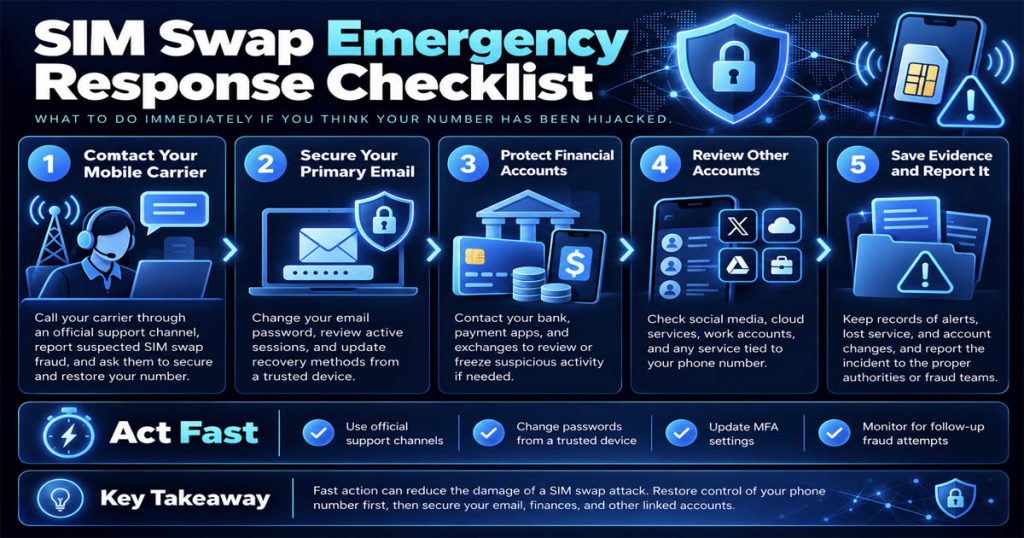
1. Contact Your Mobile Carrier Immediately
Use another device or a secure Internet connection to contact your carrier through an official channel. Inform them that you suspect an unauthorized SIM swap and request that they:
- Block any further changes
- Verify the status of your subscriber account
- Restore control of your phone number
- Strengthen security for your subscriber account
2. Protect Your Primary Email Account
If your primary email account is compromised, many other accounts may continue to be affected. You should:
- Change your password
- Check login sessions
- Log out unfamiliar devices
- Change recovery methods and MFA if necessary
3. Contact Your Bank and Financial Services
Inform your bank, e-wallet provider, or exchange about the risk of your phone number being taken over. Check recent transactions and request assistance in blocking risky activities if necessary.
4. Check Other Accounts
Review:
- Social media accounts
- Work accounts
- Cloud storage services
- Shopping accounts
- E-wallets
- Apps linked to your phone number
Change passwords and update MFA on important accounts.
5. Keep Evidence and Report the Incident
Keep emails, notifications, the time you lost signal, login logs, or suspicious transaction records. Depending on your country, you may need to report the incident to the authorities or a fraud response department.
See more: What Is a Virtual Phone Number?
Is SMS OTP Still Secure?
SMS OTP is still useful in many cases and remains widely used. However, it should not be the only layer of protection for high-value or high-risk accounts. The reason is that SMS verifies control of a phone number at the time the code is received. If that phone number is taken over through SIM Swapping, the OTP code may be redirected.
Therefore, a reasonable approach is to:
- Use SMS when necessary, but do not rely on it entirely
- Add authenticator apps, passkeys, or security keys
- Protect your mobile carrier account
- Monitor unusual signs related to SIM changes or number porting
Frequently Asked Questions About SIM Swapping
Does SIM Swapping Require Someone to Take My Phone?
No. Criminals can carry out a SIM swap by exploiting the subscriber management process and impersonating you to your mobile carrier.
Is a SIM PIN Enough to Prevent SIM Swapping?
No. A SIM PIN is just another layer of protection and does not directly prevent the carrier from issuing a replacement or transferring your number to a new SIM card.
Can an eSIM Be Subject to SIM Swapping?
Yes. If the subscriber management process is exploited, an eSIM can still be transferred without authorization.
Can SIM Swapping Bypass Two-Factor Authentication?
It can bypass forms of two-factor authentication that rely on SMS or phone calls, but it does not automatically bypass every MFA method.
How Can I Tell If My SIM Has Been Swapped?
Common signs include an unexpected loss of signal, an inability to receive calls or SMS messages, SIM replacement notifications without a clear reason, or suspicious account activity.
Conclusion
SIM Swapping is a form of taking control of a phone number that can lead to very serious consequences, especially when users rely on SMS OTP to log in, verify their identity, or recover their accounts.
Need a Virtual Number Right Now?
Skip the wait — rent an instant virtual number and start receiving SMS codes in seconds.

 Apple
 Telegram