Need a Virtual Number Right Now?
Skip the wait — rent an instant virtual number and start receiving SMS codes in seconds.
How to Rent Temporary Phone Number on SMS Nova: Step-by-Step Guide · 1:56
Transcript
Need a phone number to receive an SMS verification code but don't want to share your personal number? A temporary number can be a convenient solution for short-term verification. If you've searched for "rent temporary phone number" services online, SMS Nova provides a way to rent virtual phone numbers from different countries and receive SMS verification codes directly through an online dashboard. You don't need to purchase a physical SIM card or sign up for a monthly phone plan. Instead, you can choose a supported service, select a country, and pay for the number you need. In this guide, we'll walk you through how to rent a temporary number on SMS Nova, from creating an account and adding funds to receiving your first OTP code. We'll also explain pricing, common verification problems, and important things to consider before renting. What Is SMS Nova and Why Use It to Rent Temporary Phone Number? SMS Nova is an online platform that provides temporary and virtual phone numbers for receiving SMS verification codes. Unlike traditional mobile numbers, which typically require a SIM card and an ongoing phone plan, SMS Nova allows you to access a number for a short verification session. When an SMS arrives, you can view the message through your SMS Nova dashboard instead of using a mobile device. Benefits of Using SMS Nova SMS Nova offers several features for users who need temporary phone numbers: Multiple countries: Choose from available numbers across different countries and regions. Service selection: Find numbers for supported websites and applications. Transparent pricing: Check the rental price before confirming an order. No monthly subscription: Pay for individual numbers rather than committing to a recurring plan. Online SMS reception: Receive verification messages through your dashboard. Order management: Monitor your rented numbers, SMS messages, and order status.
Need a phone number to receive an SMS verification code but don’t want to share your personal number? A temporary number can be a convenient solution for short-term verification.
If you’ve searched for “rent temporary phone number” services online, SMS Nova provides a way to rent virtual phone numbers from different countries and receive SMS verification codes directly through an online dashboard.
You don’t need to purchase a physical SIM card or sign up for a monthly phone plan. Instead, you can choose a supported service, select a country, and pay for the number you need.
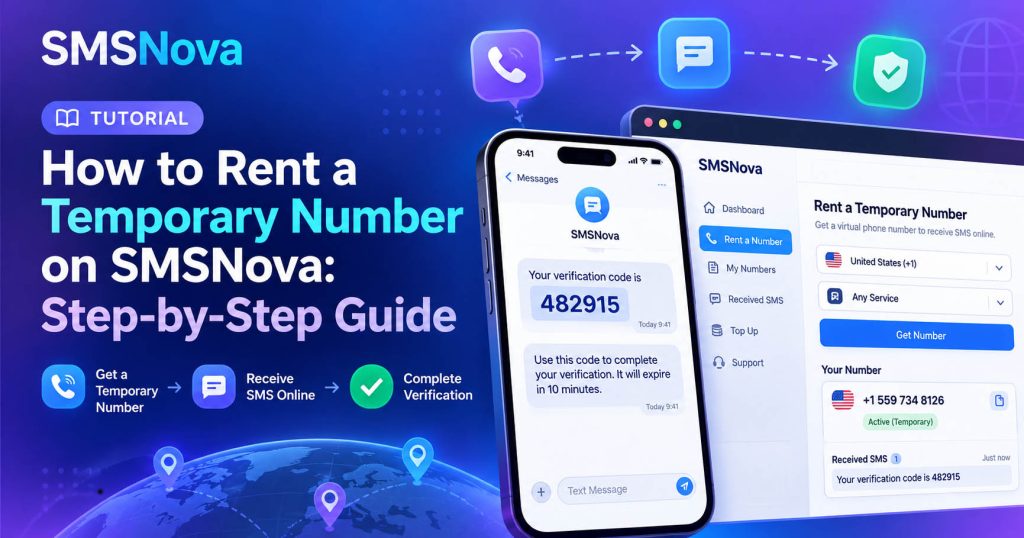
In this guide, we’ll walk you through how to rent a temporary number on SMS Nova, from creating an account and adding funds to receiving your first OTP code. We’ll also explain pricing, common verification problems, and important things to consider before renting.
What Is SMS Nova and Why Use It to Rent Temporary Phone Number?
SMS Nova is an online platform that provides temporary and virtual phone numbers for receiving SMS verification codes.
Unlike traditional mobile numbers, which typically require a SIM card and an ongoing phone plan, SMS Nova allows you to access a number for a short verification session.
When an SMS arrives, you can view the message through your SMS Nova dashboard instead of using a mobile device.
Benefits of Using SMS Nova
SMS Nova offers several features for users who need temporary phone numbers:
- Multiple countries: Choose from available numbers across different countries and regions.
- Service selection: Find numbers for supported websites and applications.
- Transparent pricing: Check the rental price before confirming an order.
- No monthly subscription: Pay for individual numbers rather than committing to a recurring plan.
- Online SMS reception: Receive verification messages through your dashboard.
- Order management: Monitor your rented numbers, SMS messages, and order status.
- Refund support: Eligible unsuccessful activations may qualify for automatic refunds under SMSNova’s policies.
These features make SMS Nova suitable for short-term SMS verification, application testing, and situations where you prefer not to disclose your primary phone number.
However, remember that a virtual phone number is not guaranteed to work with every online service. Acceptance depends on the receiving platform’s verification policies.
See more: What Is A Virtual Phone Number?
What Do You Need Before Renting a Temporary Phone Number?
Before starting, make sure you have the following:
1. An SMS Nova account
You need an account to manage your balance, rent numbers, and access received SMS messages.
2. A supported verification service
Identify the website or application where you want to receive an OTP. Make sure it allows temporary or virtual phone numbers.
3. A suitable country
Some platforms require a specific country code. Choosing the correct country can help prevent verification problems.
4. Sufficient account balance
SMSNova uses a prepaid wallet system. You’ll need enough funds to cover the selected number’s rental price.
Once you’re ready, follow the steps below.
How to Rent a Temporary Number on SMSNova: 7 Easy Steps
The process of renting a temp number on SMS Nova is straightforward. You can complete it through your web browser without installing a separate mobile application.
Step 1: Visit SMS Nova and Create an Account
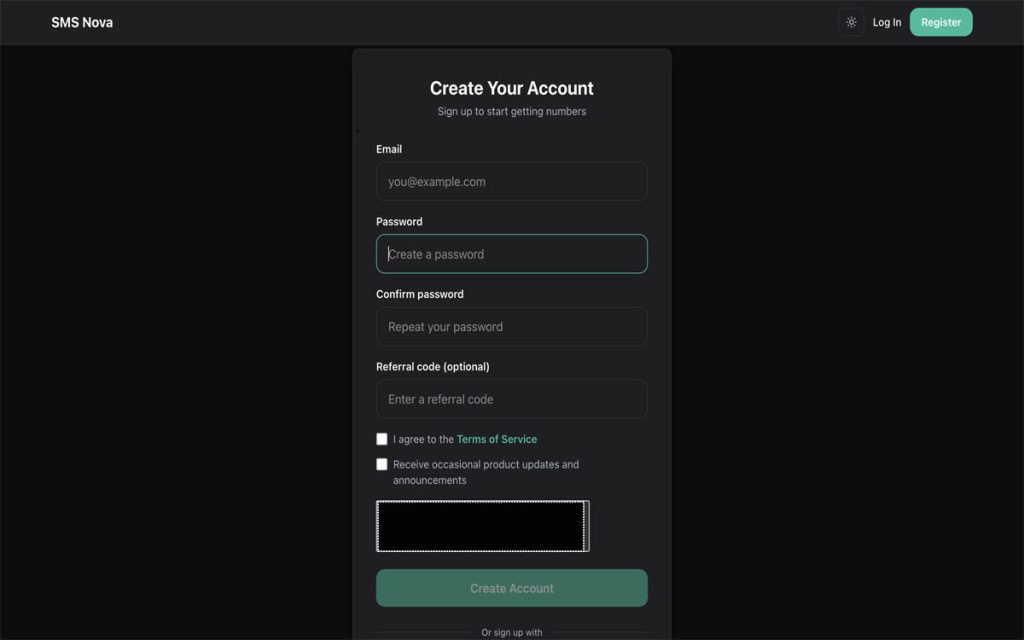
First, open your browser and visit the official SMS Nova. Find the registration option and follow the instructions to create an account. Enter the required registration details, including a valid email address, and complete any additional verification requested by the platform.
Once your account is ready, sign in to access the SMS Nova dashboard. Your account lets you manage payments, view rental history, and monitor incoming SMS messages in one place.
Tip: Use a secure password and an email address you can access. Your SMS Nova account may contain verification messages and payment-related information.
Step 2: Add Funds to Your SMS Nova Account
Before you can rent a temporary phone number, you need to add funds to your account balance.
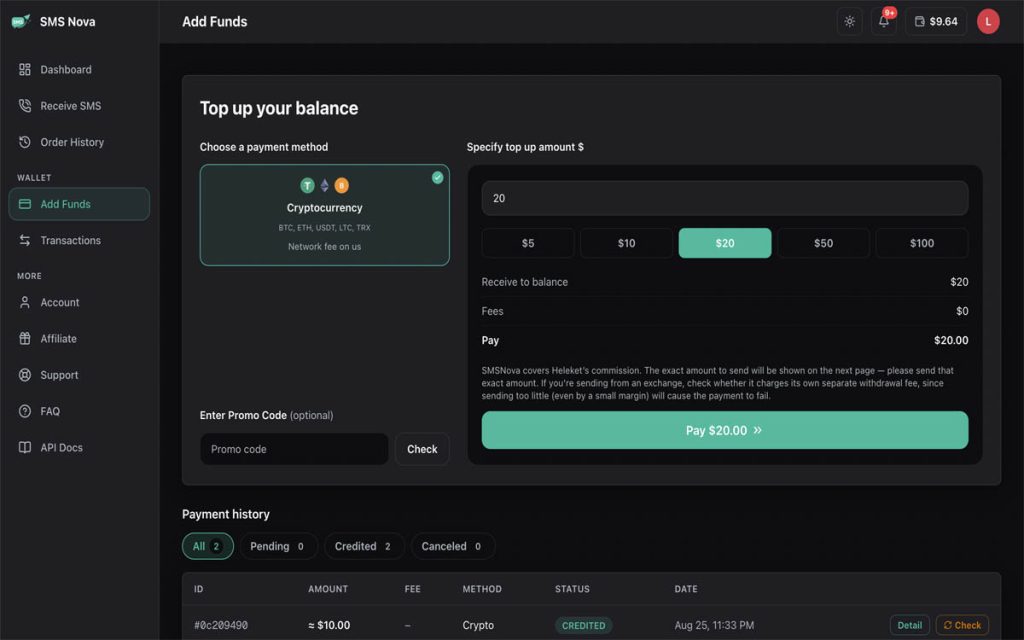
After signing in:
- Navigate to the wallet or deposit section.
- Choose one of the currently available payment methods.
- Enter the amount you want to deposit.
- Follow the payment instructions.
- Return to your dashboard and verify your updated balance.
SMS Nova lists payment options that may include bank cards, PayPal, and cryptocurrency, depending on availability. Payment processing times can vary between providers, so make sure your balance has been credited before attempting to rent a number. You don’t need a monthly subscription. Your wallet balance can be used to purchase individual numbers when needed.
Step 3: Select the Service You Want to Verify
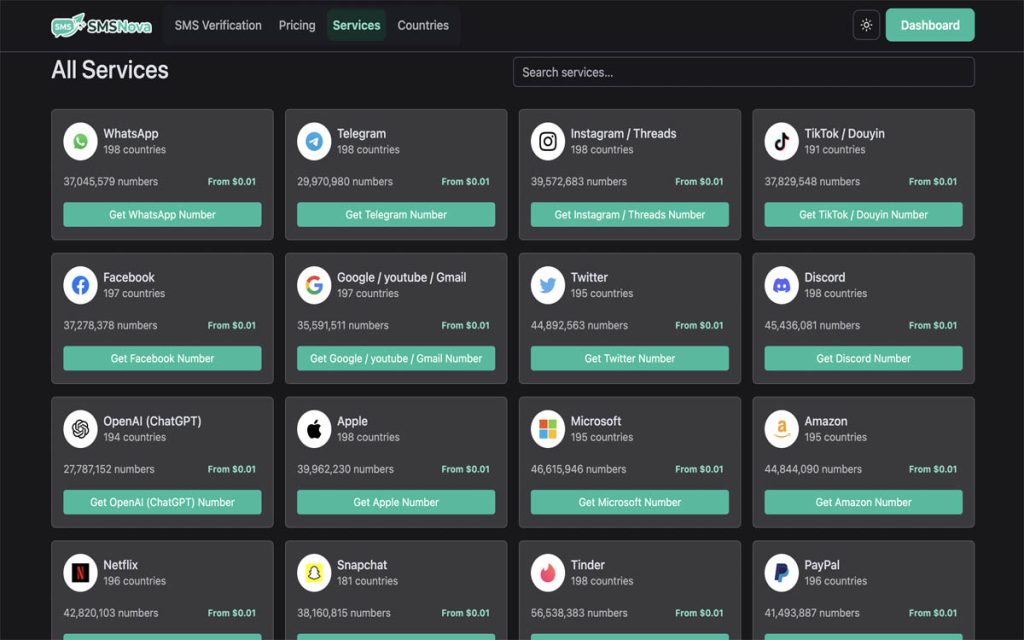
Next, choose the website or application for which you need an SMS verification code. Visit the SMS Nova Services page to browse supported platforms. Use the search feature to find the service you need, then select it to explore available number options.
Choosing the correct service is important because phone number availability and SMS delivery support can vary between platforms. For example, a number offered for one service may not be appropriate for another.
Tip: Always select the actual service where you intend to receive the verification message. This helps avoid ordering a number that doesn’t match your needs.
Step 4: Choose a Country and Check Number Availability
After choosing your service, select the country from which you want to rent a virtual phone number. You can explore available locations through the SMS Nova Countries page.
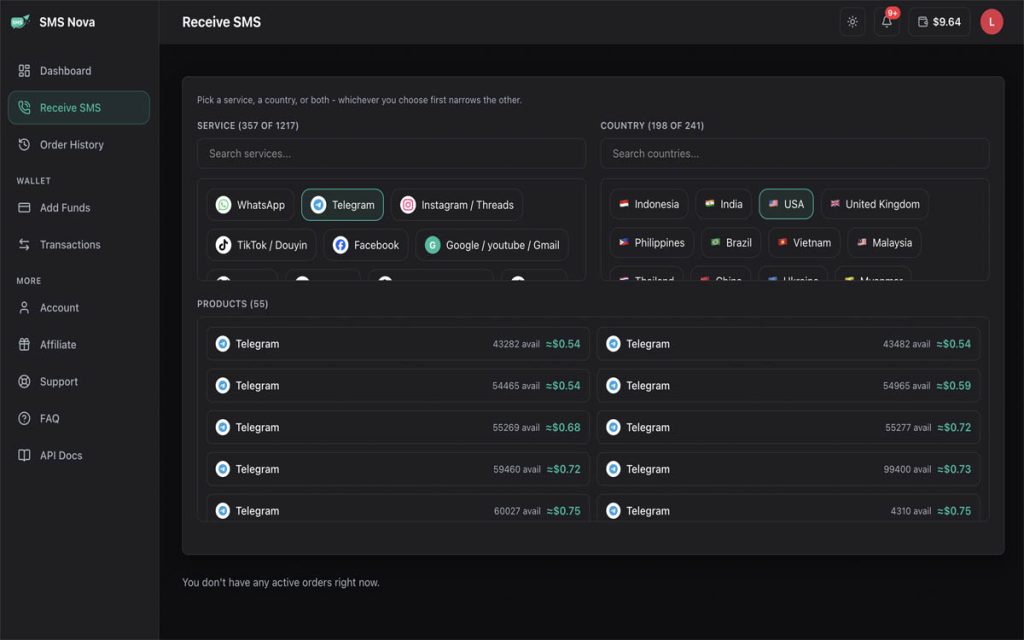
Before making your selection, check:
- Country code: Confirm that the international dialing code matches your requirements.
- Availability: Make sure numbers are currently available.
- Rental price: Compare the displayed prices.
- Platform compatibility: Check whether the target service accepts numbers from that country.
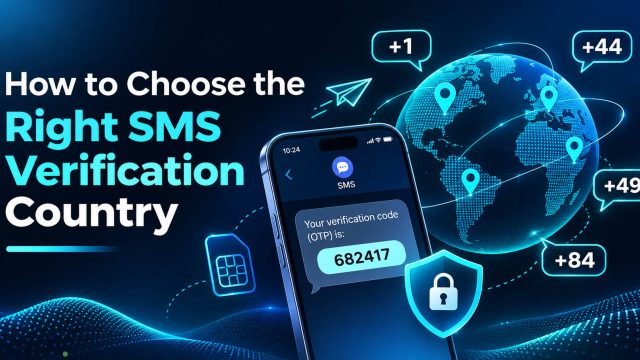
For example, the United States uses +1, the United Kingdom uses +44, and Vietnam uses +84. Keep in mind that the cheapest number isn’t always the best option. Your selected country must also meet the verification requirements of the service you’re using.
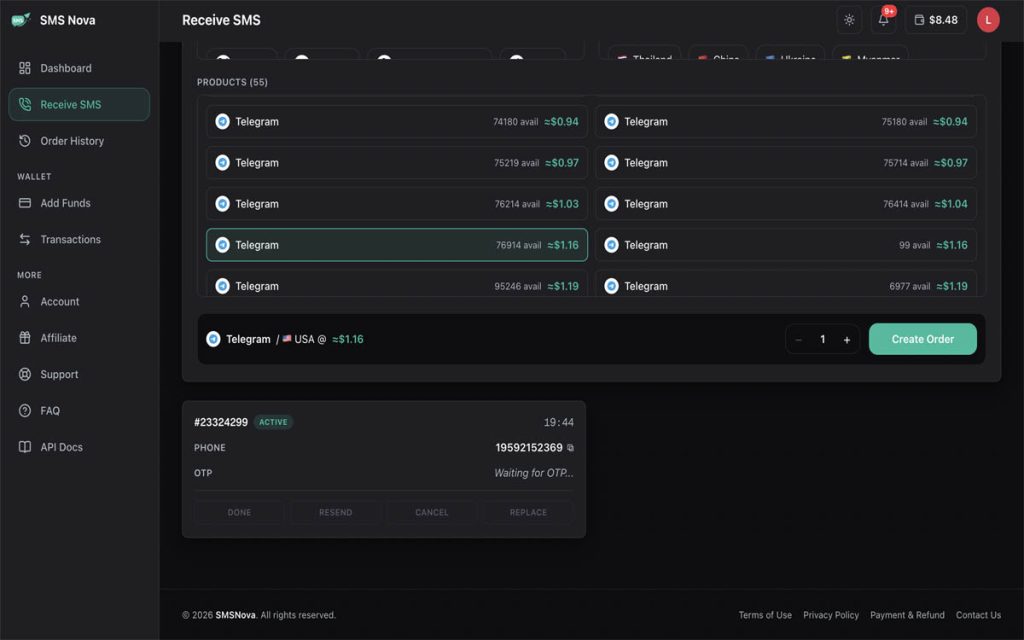
Step 5: Rent Your Temporary Phone Number
Once you’ve selected a service and country, you’re ready to rent your number. Review the available offer and confirm the displayed price before proceeding. Click the relevant purchase or rental option to place your order.
When your order is successful, SMSNova assigns an available number that you can use during the activation session. Copy the assigned phone number and check the order details, including its status and any displayed time limit.
Important: Temporary numbers are intended for limited use. Avoid starting a verification process if the rental session is close to expiring.
Step 6: Enter the Temporary Number and Request an OTP
Now return to the website or application that requires phone verification. Open its phone number verification page and enter the temporary number you rented from SMSNova.
Make sure you:
- Select the correct country code.
- Enter or paste the complete phone number.
- Double-check the number format.
- Request the SMS verification code.
- The website will attempt to send an OTP to your rented number.
Avoid repeatedly requesting new codes within a few seconds. Some platforms limit verification attempts or temporarily restrict requests when too many codes are requested.
Tip: If the platform automatically adds a country code, don’t enter the same code twice.
Step 7: Receive Your SMS OTP and Complete Verification
After requesting the verification code, return to your SMS Nova dashboard.
Need a Virtual Number Right Now?
Skip the wait — rent an instant virtual number and start receiving SMS codes in seconds.
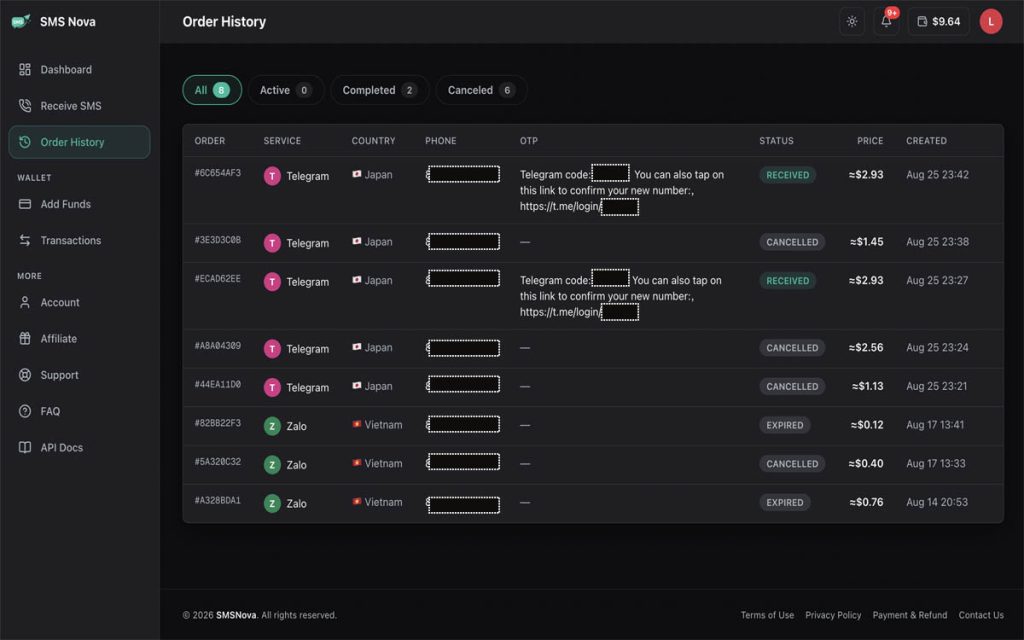
Open the active rental and monitor the SMS reception status. When the message arrives, the verification code or SMS content will appear in the corresponding order details. Copy the latest OTP and return to the website or application where you requested verification. Enter the code before it expires and complete the verification process.
Remember that SMS delivery times can vary depending on the sender, mobile network, and verification service. Once you’ve finished, check the final order status in your SMS Nova dashboard.
Ready to get started? Rent temporary phone number on SMS Nova and receive your verification SMS online.
How Much Does It Cost to Rent a Temporary Number on SMSNova?
One advantage of SMSNova is its pay-per-number pricing model. Instead of purchasing a recurring subscription, you can add funds to your account and pay for individual number rentals. According to SMS Nova published pricing information, some temporary phone numbers start from $0.01.
However, actual prices depend on several factors:
- Country: Different regions have different rental prices.
- Service: Verification costs may vary between applications.
- Availability: Current inventory and demand can affect pricing.
For example, renting a number from one country for a particular service may cost more than selecting another supported country. SMS Nova displays the applicable price before you confirm your order, so you can review the cost in advance.
For current rates, visit the official SMS Nova Pricing page.
What If You Don’t Receive Your SMS Verification Code?
Sometimes, an SMS verification code may not arrive as expected. This doesn’t necessarily mean your temporary number is unusable. Several factors can affect SMS delivery.
Common Reasons for Missing OTP Codes
Incorrect phone number or country code
Double-check that you’ve entered the complete number using the correct international format.
Unsupported virtual phone number
Some platforms restrict temporary, disposable, or VoIP numbers. If the service rejects the number type, requesting additional codes may not solve the problem.
SMS delivery delays
Mobile carriers, international SMS routes, and third-party verification providers can occasionally experience delays.
Too many verification requests
Repeatedly requesting OTP codes may trigger anti-spam restrictions or invalidate earlier codes.
Expired rental session
If your temp number expires before the message arrives, you may no longer be able to access incoming SMS messages.
How to Troubleshoot SMS Delivery Problems
First, verify the phone number, country code, selected service, and remaining rental time. Next, wait for the message rather than immediately requesting multiple codes.
If an OTP arrives after several requests, use the latest valid code. If the problem continues, review your order status and contact SMS Nova support when appropriate.
Can You Get a Refund If No SMS Arrives?
SMS Nova provides refund mechanisms for certain unsuccessful activations. If no verification SMS arrives within the permitted activation period, or the service fails because of an issue covered by SMS Nova policies, the order may qualify for an automatic refund.
Depending on the circumstances, refunds may be credited to your SMS Nova account balance or processed through an eligible original payment method.
However, not every unsuccessful verification qualifies for a refund.
For example, refunds may not be available when:
- An SMS code has already been successfully delivered.
- The third-party platform rejects virtual phone numbers.
- The user selects the wrong country or service.
- Verification fails because of incorrect information or user actions.
For complete details, review the official SMS Nova Payment & Refund Policy.
Important Things to Know Before Using a Temporary Phone Number
Renting a temporary number can be useful, but understanding its limitations is essential.
Don’t Use Temporary Numbers for Important Long-Term Accounts
A temporary phone number is generally intended for short-term use. After your rental expires, you may lose access to the number. It may eventually be reassigned to someone else.
For this reason, avoid relying on temporary numbers for banking, your primary email, financial accounts, or any service requiring long-term account recovery. Use a number you control permanently for important accounts.
Not Every Website Accepts Virtual Numbers
Some websites reject disposable or virtual phone numbers as part of their verification and security policies. Renting a number through SMS Nova does not guarantee successful verification on every platform. Always check the target service’s requirements and follow its terms of use.
Understand the Difference Between Temporary and Virtual Numbers
Although the terms are often used interchangeably, they aren’t exactly the same.
A virtual phone number is a broader category of phone numbers managed through online infrastructure.
A temporary phone number specifically refers to a number available for a limited period or purpose.
A temp number is simply a shorter, informal term for a temporary number.
SMS Nova focuses on short-term virtual numbers intended primarily for SMS verification.
Frequently Asked Questions About Rent Temporary Phone Number
Can I Rent Temporary Phone Number Without a SIM Card?
Yes. SMS Nova allows you to receive supported SMS verification messages through an online dashboard without installing a physical SIM card.
Can I Rent Temporary Phone Number From Another Country?
Yes. You can select numbers from supported countries, subject to availability and the requirements of the service you want to verify.
Can One Temporary Number Receive Multiple OTP Codes?
It depends on the rental type and service restrictions. Some numbers support a single activation, while others may receive additional messages during an active session. Multiple OTPs are not guaranteed.
Can I Reuse a Temporary Phone Number After It Expires?
You shouldn’t assume that an expired number will remain available. Once your rental ends, access may be lost, and the number may eventually be reassigned.
Is Rent Temporary Phone Number Safe?
A temporary number can help limit how often you share your personal phone number. However, its privacy and security depend on the provider, the number type, and how long you control the number. It is not a substitute for secure long-term account recovery.
Do I Need to Add Funds Before Renting a Number?
Yes. SMS Nova uses a prepaid balance system for number rentals. Add sufficient funds to your account before placing an order.
Conclusion: Start Rent Temporary Phone Number on SMSNova
Renting a temporary phone number doesn’t have to be complicated. With SMS Nova, you can create an account, add funds, choose a supported service and country, rent an available number, and receive your SMS verification code through an online dashboard.
The key is to select the correct service, review the rental details, and understand the limitations of temporary numbers before making a purchase. Whether you’re testing an application or need a short-term number for legitimate SMS verification, SMS Nova offers a convenient pay-per-number solution.
Need a Virtual Number Right Now?
Skip the wait — rent an instant virtual number and start receiving SMS codes in seconds.

 Apple
 Telegram